Enter a new era of full-body tracking with Viso FBT! Say goodbye to awkward and restrictive physical trackers. Now, you can dive completely into virtual reality using just the camera on your smartphone. Best of all, this groundbreaking app is completely free and remarkably easy to use, welcoming all curious VR explorers. Discover the next generation of true VR immersion with Viso FBT!
Design and User Experience:
Intuitive Design
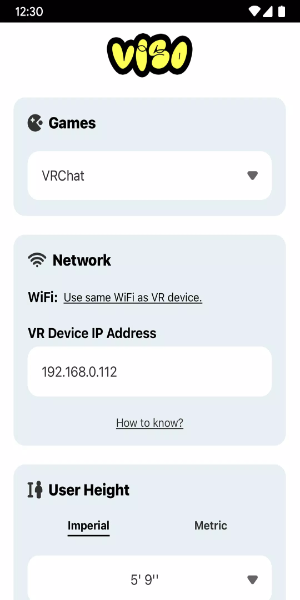
Viso FBT features a user-focused design that makes setting up and using full-body tracking in VR a simple process. The app cleverly transforms your smartphone's camera into a powerful motion sensor, removing the requirement for extra equipment. Its interface is clear and guides you through a smooth calibration process for a straightforward and uncomplicated start.
Seamless Integration
Viso FBT works perfectly with major VR platforms such as VRChat on both Quest and SteamVR. It harnesses your phone's camera to detect and convert every nuance of your real-world movements into the virtual space. This broad compatibility means it fits into many different VR systems, offering users flexibility and ease of use.
Real-Time Motion Capture
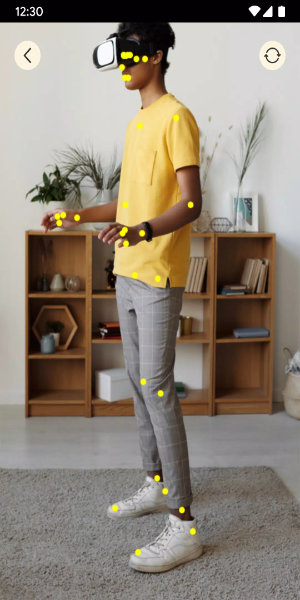
Enjoy a new level of real-time motion capture with Viso FBT. The app precisely tracks movements from your elbows down to your feet, allowing for accurate and responsive avatar animations. Whether you're dancing, gesturing, or simply moving around, Viso FBT faithfully replicates your actions in the virtual world, deepening your sense of presence and engagement.
User-Friendly Interface
The Viso FBT interface is built for ease of use. It's intuitive and approachable, featuring straightforward guidance for calibration and setup. You can effortlessly tweak settings to fine-tune your VR experience, ensuring a smooth and customized integration of full-body tracking into your virtual activities.
Enhanced Immersion
Viso FBT significantly boosts VR immersion by enabling natural physical interaction inside digital worlds. By using your smartphone camera for motion tracking, it closes the distance between you and the virtual environment. The result is a rich, immersive experience accessible to all users, no matter their hardware setup or prior experience.
Powerful Functions of Viso FBT:
Precise Motion Tracking
Viso FBT delivers outstanding motion tracking precision using only your smartphone's camera. It captures the motion from your elbows to your feet and converts it into exact avatar animations in VR environments like VRChat on Quest and SteamVR. This capability provides a fluid and responsive VR experience without requiring extra physical hardware.
Real-Time Avatar Animations
Witness your VR avatar move in real-time, perfectly reflecting your own body's motions with Viso FBT. The app captures and translates your gestures, stances, and locomotion into the virtual realm, greatly enhancing interaction and realism. Whether you are dancing, walking, or interacting, your avatar's movements are synchronized and natural for a more engaging and lifelike experience.
User-Friendly Setup
Viso FBT offers a hassle-free setup process that demystifies full-body tracking configuration. You can quickly calibrate your smartphone's camera for optimal tracking performance. With clear, step-by-step instructions, the app ensures that even newcomers to VR technology can get Viso FBT up and running without delay.
Multi-Platform Compatibility
Viso FBT provides excellent flexibility through its multi-platform support. It is compatible with leading VR platforms, including VRChat on both Quest and SteamVR, serving a wide community of VR enthusiasts. Whether you use a standalone headset or a PC-based system, Viso FBT integrates smoothly, allowing you to enjoy full-body tracking across various setups.
Free and Accessible
Viso FBT is completely free, making advanced full-body tracking available to everyone. The app replaces the need for costly physical trackers, offering an affordable path to a deeply immersive VR experience. With Viso FBT, you can elevate your virtual adventures without any financial hurdles, ensuring this innovative technology is within everyone's reach.
How to Install:
- Download the APK: Get the installation file from a trusted source like 40407.com.
- Enable Unknown Sources: Open your device's Settings, go to Security, and allow installation from unknown sources.
- Install the APK: Find the downloaded file and follow the on-screen prompts to install it.
- Launch the App: Open the app and start your full-body tracking journey.
Tags : Tools