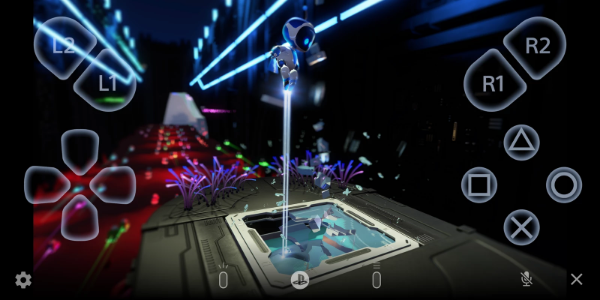
PS Remote Play transforms how you game by letting you take your PlayStation® experience beyond the living room. With this app, whether you have a PS5™ or PS4™, you can connect remotely to your console using your Android mobile device. Enjoy your favorite games anywhere, with complete flexibility and ease.
Features and Functionality
PS Remote Play brings a rich set of features to elevate your gameplay:
1. Remote Screen Display:
- Stream your PS5™ or PS4™ console screen to your Android mobile device, delivering console-quality gaming straight to your hands, wherever you are.
2. Mobile Control Options:
- Navigate and play smoothly with the on-screen controller on your mobile device. For Android 10 or later, use the DUALSHOCK®4 wireless controller; for Android 12 or later, the DualSense™ wireless controller; and for Android 14 or later, the DualSense Edge™ wireless controller for that authentic console feel.
3. Voice Chat Integration:
- Jump into voice chats using your mobile device's microphone, keeping you connected with friends and gaming partners during play.
4. Text Input Capability:
- Easily enter text on your PS5™ or PS4™ console with your mobile device's keyboard, making in-game communication quicker and smoother.
5. Compatibility Requirements:
- To get started, make sure your setup meets these conditions: Android 9 or later on your mobile device, updated system software on your PS5™ or PS4™ console, and an active PlayStation Network account. A reliable internet connection is also key for uninterrupted use.
6. Data Usage Considerations:
- Keep an eye on data use when playing over mobile data, as it can consume more data than standard video streaming. Connection quality may vary by carrier and network.
7. Verified Devices:
- PS Remote Play is tuned for best performance on verified devices like the Google Pixel 8, 7, and 6 series. Note that using unverified devices could affect functionality.
8. Controller Compatibility:
- Choose your preferred control style: DUALSHOCK®4 wireless controller for Android 10 or later, DualSense™ wireless controller for Android 12 or later, and DualSense Edge™ wireless controller for Android 14 or later.
9. Performance Considerations:
- Depending on your mobile device's specs, you may notice input lag during gameplay when using wireless controllers, which can affect responsiveness.
Usage Guidelines and Notes
PS Remote Play enriches your PlayStation® gaming, but there are a few things to keep in mind:
- Device Compatibility: Use a verified mobile device for the best performance. Unverified devices may not support all features or games.
- Game Compatibility: Certain games may not support remote play fully or may need extra setup.
- Controller Experience: Features like vibration may not feel the same as when playing directly on your PS5™ or PS4™ console.
- Input Lag: Depending on your device and network, you might experience some input lag when playing with wireless controllers.
Conclusion:
PS Remote Play marks a major step in gaming accessibility, giving PlayStation® fans the freedom to play their favorite games on Android devices, anywhere. By linking your PS5™ or PS4™ console to mobile, the app allows you to stream games, control your console, join voice chats, and interact seamlessly with various controllers. With added conveniences like text input and real-time screen display, PS Remote Play keeps you connected to your gaming world no matter where you are.
Tags : Lifestyle