The enchanting system in Minecraft: Play with Friends is a vital mechanic, allowing players to bestow magical properties on their weapons, armor, and tools. These enhancements offer powerful benefits, including improved durability, greater damage output, faster mining speeds, and unique capabilities like self-repair or damage resistance. This guide explains how to set up your enchanting station, details the most effective enchantments for different gear, and provides strategies to get the most out of your enchanting efforts.
Understanding Enchanting and Its Importance
Enchanting enables players to add special abilities and improvements to their equipment, providing a crucial advantage in combat, resource gathering, and survival. Standard, unenchanted tools are inefficient and fragile, while base armor offers only minimal protection. This system enriches gameplay by letting players customize their gear for specific purposes—for example, a pickaxe that increases diamond yield or a sword that inflicts fire damage. For players tackling challenging content like the Nether, the End, or formidable bosses such as the Warden and Ender Dragon, effective enchanting becomes essential for victory.
Setting Up Your Enchanting Table and Room
Your first step into enchanting is crafting an Enchanting Table. You'll need 4 Obsidian blocks, 2 Diamonds, and 1 Book. These are mid-game materials; obtaining obsidian requires a diamond pickaxe, and diamonds are a valued early-game find. Once crafted, the enchanting table serves as the centerpiece of your setup.
To unlock higher-level enchantments, you must place Bookshelves around the table. You need 15 bookshelves arranged in a square or circle, positioned exactly one block away from the table with an air gap between them. Each bookshelf boosts the maximum available enchantment level, reaching the cap of Level 30 when all 15 are correctly placed. Craft bookshelves using Books (made from paper and leather) and Wooden Planks, making sugarcane farms and cow breeding important early preparations.
Finally, enchanting consumes Experience Levels (XP) and Lapis Lazuli, a blue ore found deep underground. A lack of either resource prevents enchanting, motivating players to explore, battle mobs, or establish XP farms.
How the Enchanting Process Works
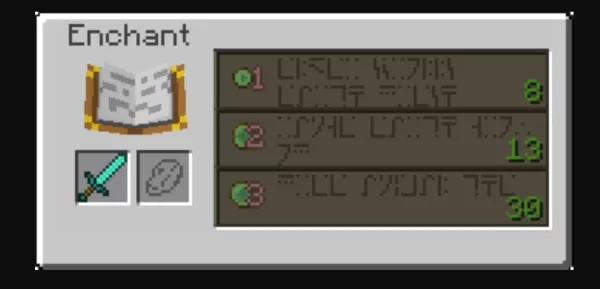
With your enchanting table ready, the process is simple. Place the item you wish to enchant in the first slot of the interface and Lapis Lazuli in the second. The table presents three enchantment choices, each with a specific XP and Lapis cost. The higher your current level, the more potent the available enchantments become, with the strongest options requiring Level 30.
Hovering over a choice reveals at least one guaranteed enchantment, with a chance for additional bonuses. This element of chance adds excitement and challenge. For more control, consider enchanting Books first. You can later apply these enchanted books to specific gear using an Anvil, allowing for targeted customization.
Using Anvils to Combine and Enhance Enchantments
Anvils, crafted from Iron Blocks and Iron Ingots, are essential for advanced enchanting. They let you:
Merge enchantments by combining two enchanted items.Apply enchanted books directly to gear.Rename items for personalization.
However, using an anvil costs XP and incurs a Prior Work Penalty. Each successive use on the same item raises the XP cost for further modifications, potentially making it "Too Expensive" to work on. To avoid this, plan your combinations strategically, merging books in an efficient order before applying them to your final equipment.
A Grindstone can strip all non-curse enchantments from an item, refunding some XP. This is helpful for resetting gear or salvaging valuable enchantments.
The Core Enchantments: Mending and Unbreaking
Mending and Unbreaking are the foundational enchantments for any top-tier gear. Mending automatically repairs your item as you collect XP, granting it near-permanent durability with regular play. Unbreaking gives each use a chance to not reduce durability, dramatically extending the item's lifespan. Together, these enchantments ensure your valuable equipment remains functional indefinitely, making them the highest priority for all your tools and armor.
You can experience Minecraft: Play with Friends on a larger PC or laptop screen using BlueStacks, enjoying enhanced control with your keyboard and mouse.
Continue mastering Minecraft: Play with Friends with our other comprehensive guides:
How to Play Minecraft on PC with BluestacksHow to Never Die in Minecraft: Play with Friends Survival The Ultimate Strategy GuideMinecraft Map Guide: Navigating, Creating, and Mastering Every TerrainMinecraft Bundles of Bravery Update – Hardcore Mode, Bundles, and What’s New for Bedrock PlayersBlueStacks Guide to Building Animal Farms in Minecraft